
On this page you will find out how to install Sodium using Fabric, Quilt, or NeoForge mod launchers. This guide works for all Minecraft versions, including 1.21.10, 1.21.9, 1.21.8, 1.21.7, 1.21.6, 1.21.5, and older ones.
Let’s start with the installation process for Sodium Fabric as it is considered by players the best mod loader for this optimization mod.
How to Install Sodium on Fabric 
The installation process fairly is straightforward:
- Go to fabricmc.net, click on Download, and select Download for Windows:

- Double click on fabric-installer.exe and you will be greeted with the following window:
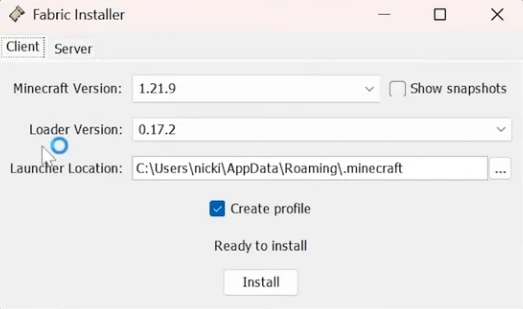
- Minecraft version: select the Minecraft version you have. The installer automatically selects the latest game version.
- Loader version: The Fabric version you want to have. Install the latest one.
- Launcher location: In most cases, you want to leave it on default settings.
- Create profile: Leave checked.
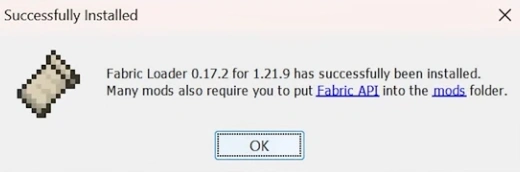
- Click Install. After successful Fabric installation you’ll get the following window (Fabric and Minecraft version may differ):
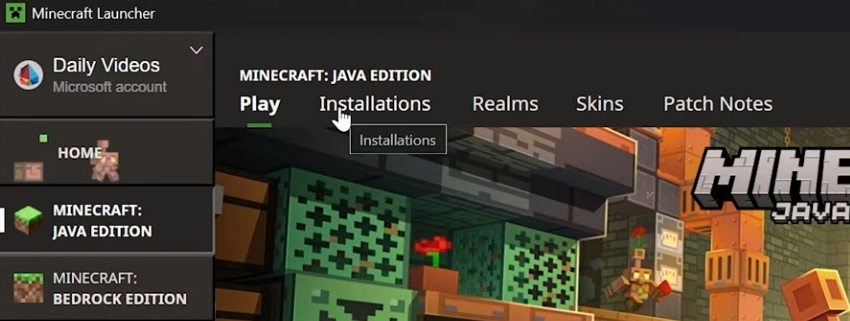
- Start the Minecraft launcher.
- At the top click on Installations tab:
- Check Modded under Versions:

- Hover over Fabric Loader and click on Open installations folder:

- Now it is time to download Sodium for Fabric. Download the mod version that is compatible with your Minecraft and Fabric version. Meaning, if you have Minecraft 1.21.9, you selected 1.21.9 during Fabric installation, you need to download Sodium mod that works with that version.
- Move the downloaded .jar file into the mods folder of that installations folder. If you left launcher location unchanged during Fabric installation, the path to the folder will look like this: C:\Users\YOUR_WINDOWS_USERNAME\AppData\Roaming\.minecraft\mods.
- Hover over Fabric Loader and click Play:

- Next time just select Fabric Loader profile on the main Minecraft tab.
- Enjoy increased performance in Minecraft!
How to Install Sodium on Quilt 
The process of installing Sodium on Quilt mod loader is similar, but comes with a few differences.
- Firstly, make sure you have started Minecraft launcher at least once. If it’s opened, close it.
- The, go to quiltmc.org, select Install.
- Then click on Client (on the left) and select Windows (.exe):
- Start the Quilt installer. If you’ve got Windows protected your PC message, click on More info and select Run anyway:

- Similarly to installing Fabric, you will be prompted to select Minecraft version, Loader version, Launcher location, and enable Generate profile:
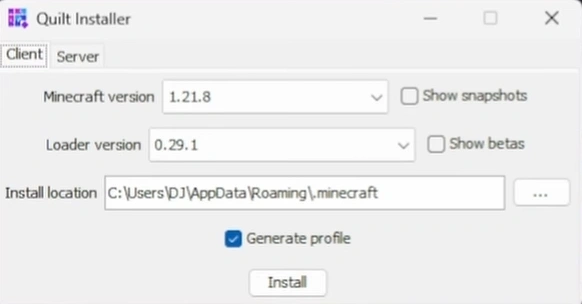 Make sure you select the correct Minecraft version (how to figure out which one you have)!
- Note: if you have already installed Fabric or any other mod loader, change the default launcher location path!
- Click on Install, and you should receive the message of successful Quilt installation:

- Next, download Sodium for Quilt and place it into the mods folder within the .minecraft folder.
- If you don’t know where the Quilt mod launcher is located, do the following:
- Open Minecraft launcher, and go to Installations tab (at the top).
- Hover over Quilt and click on Open installation folder:

- Navigate to the mods folder and place the downloaded Sodium .jar file there.
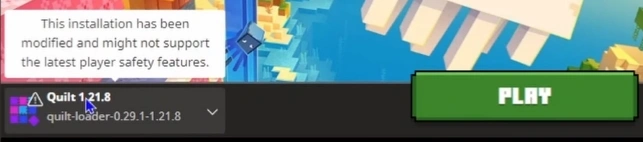
- To start playing Minecraft with Sodium mod enabled, select Quilt loader profile and click Play.
How to Install Sodium on NeoForge 
Installing NeoForge mod loader for Minecraft is similar to previous ones, but also has a few differences.
- Firstly, you go to the neoforged.net where you should get the latest NeoForge installer. Unlike Fabric or Quilt, you select your Minecraft and NeoForge versions before you download the file:

Make sure you select the correct Minecraft version. How to know which one you have? - Double-click on the installation file and select type (Client, Server or Fat) and folder for the mod loader:
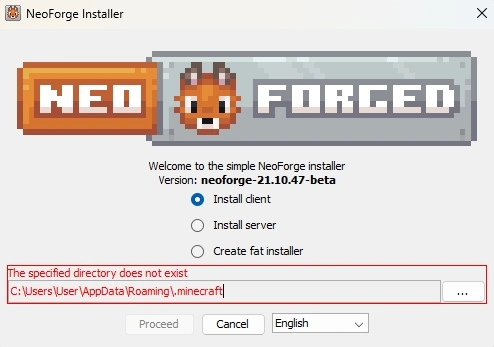
For Sodium you need to select Client Note: change the default installation folder if you have already installed any mod loader in that folder.
- Click on Proceed. Wait till all the files are downloaded and installed.
- After the installation process is complete, go to the Sodium NeoForge download page and download the mod version you’d like to use. We recommend to always use the latest Release version.
- Move the .jar file into .minecraft\mods folder. If you have changed the default location or don’t know where it is located, do the following:
- Open Minecraft launcher and select Installations tab.
- Hover over NeoForge and click on the folder icon
 . That will open NeoForge mod loader location.
 - Navigate to the mods folder within that location and place Sodium there.
- Select NeoForge profile and enjoy the game with the best performance mod ever!